
Looks like a great tool in the making 
A very great tool Arvy!
The recognition of the different devices working well.
I have one little issue: With a square it always says: “Multi LED Mirror”. But in this mode it is not possible to control single LEDs or am I wrong?
@p0ke, it should allow changing the LED mode or doesn’t it? There is a button to configure BlinkStick next to the combobox with the serial. I’ve just noticed that when you change the mode it does not update that on the overview page. Will fix that in RC2 release.
You can still use individual LEDs in Multi LED Mirror mode, however setting LED color at index 0 will affect all LEDs on the Square/Strip.
Right, thats the point. No refresh on the main page. So it is not a problem.
Never know that you can control single LEDs in mode 3, thanks 
@p0ke yep you can
In mode 3 if you send data to report 0x01, then it lights up all LEDs, but 0x05 - 0x09 still work to control LEDs individually. This applies to Strip, Square and Flex with an exception to Flex that it only controls first 8 LEDs in mode 3.
didnt know that too , the wiki docs could use some updating
With the 2.0-rc candidate none of the options work. I can’t change the color. I can’t change the mode. It’s on Inverse, which is correct by the way.
The serial number is a bunch of weird characters.
Client 1.0 works fine.
r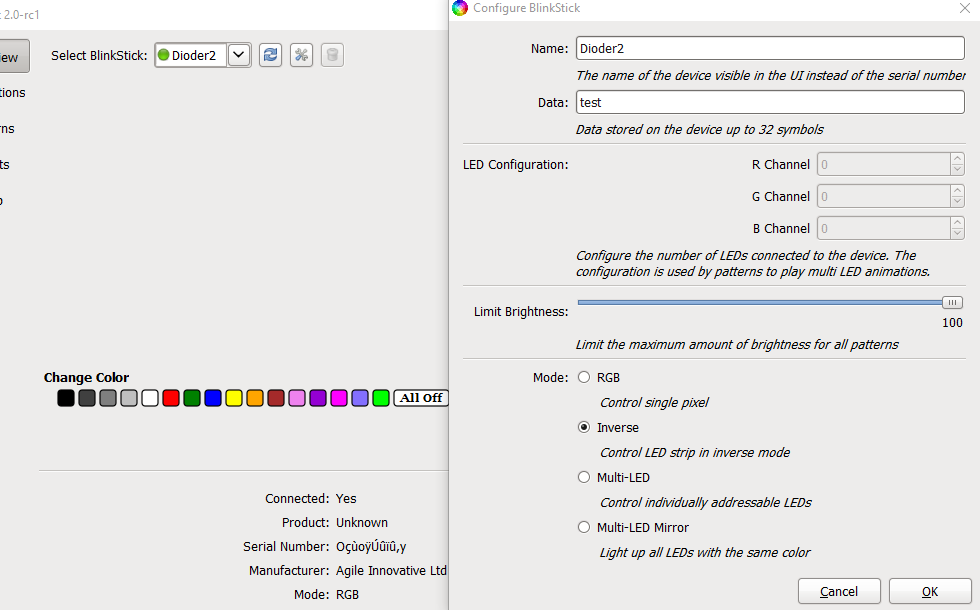
Doesn’t look right. Can you please remind me the device you have?
BlinkStick Pro v1.0.
This same weird serial number is also displayed in Client 1.0 by the way. But that one still works.
Has it been showing up like that in Client 1.0 since you received the device?
No, I don’t think so. It was like that suddenly but it’s been that way for a while. As it didn’t hinder the functionality I didn’t think much of it.
RC2 released. Please check the top of the page for the new link.
Ambilight is working with 1.0.3 Blinkstick, but it doesn’t with 2.0 RC2. That’s sad considering i mainly bought this to use it while gaming. Anything i can do ?
Good to know you’re working on this
Looking forward to the update, keep up the good work
Are you planning on adding a way to choose a specific color ? Because now it seems that we only have 16 color choices. Could you add like a full spectrum thing ? I think 1.03 had this
For what do you need this? The first page is only for testing the device. In the patterns you can already use the whole color pool and this patterns can be used in the notification.
Oh right, i guess i just didn’t undertsood how was the app working
Appreciating the update, thank you.
Ambilight doesn’t work for me either atm (win10 64).
One feature request, % for disk usage if possible.
If not I’ll keep plugging away at the rainmeter integration.